
Font Studio — Font Inspector
See what's actually inside the font file.
"What exactly is this font?" — you need the family names, metrics, glyph count and character coverage, read from the file itself, not from a file name.
Capabilities
What it does
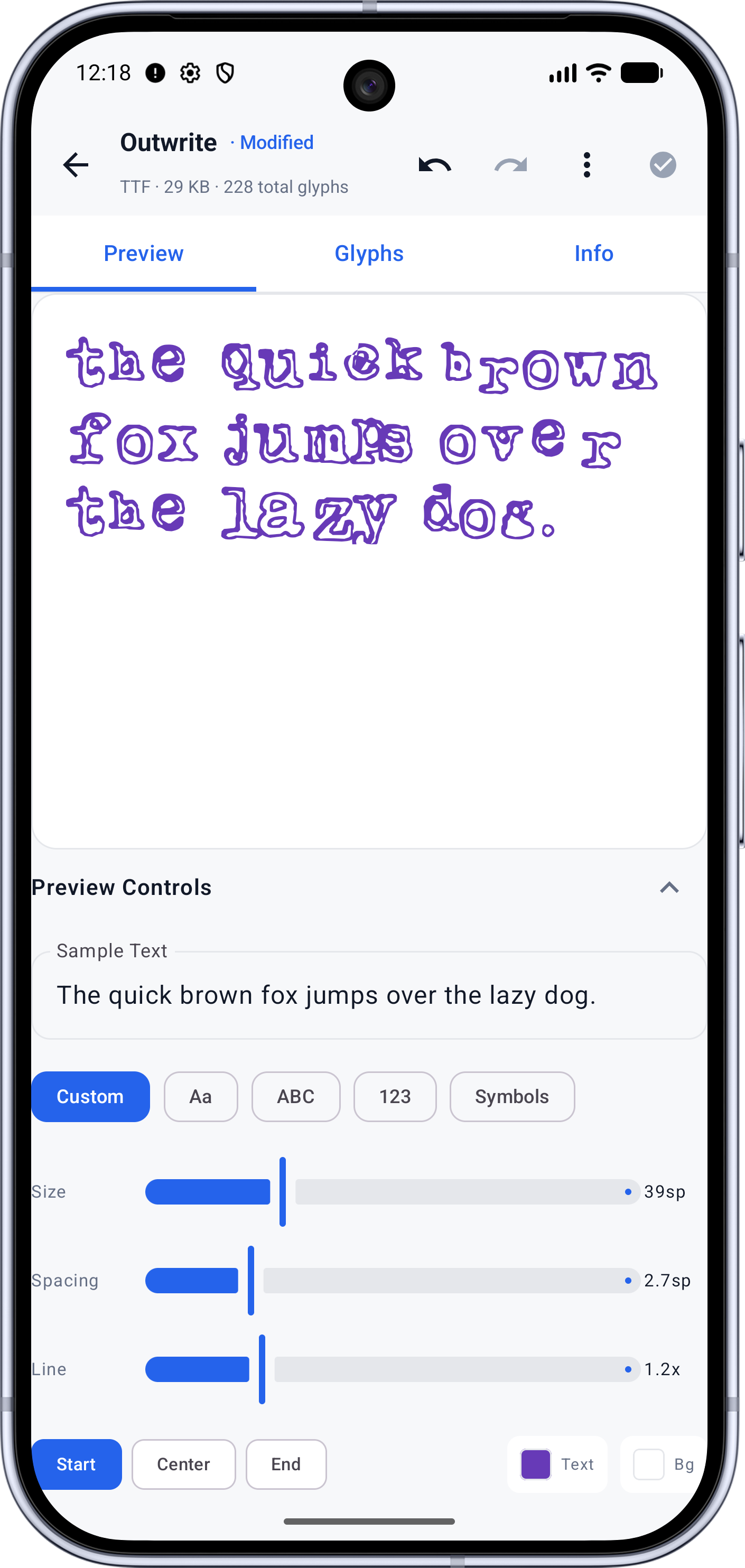
- Live preview with your own sample text
- Glyph grid showing the character set the font really maps
- Metadata: family, style, version, units per em, file size
- GSUB/GPOS layout table inspection
- Read-only — inspection never modifies the file
- Free, no account
Screens
See it working
Workflow
How it works
- 01
Open the font — everything is parsed on device; the file is not uploaded.
- 02
Preview renders live text so you can judge the design before committing.
- 03
The Glyphs grid shows coverage and where it ends.
- 04
The Info tab lists the metadata and metrics read straight from the binary tables.
Who it's for
Made for this job
- Developers wiring font-family stacks or license notes
- Anyone auditing a font before shipping it
Docs
In the documentation
Guides
Step-by-step walkthroughs
More Font Studio tools
- Font Editor
- Glyph Editor
- Font Converter
- Font Repair
- Font Subsetter
- Font Merger
- Font Health
- Font Editor for Android
- Font Editor for iPad
Looking for everything in one place? Back to the Font Studio overview.
On-device processing
Try Font Studio
Free to download on Android and iPad. Font processing happens on your device — your font files are not uploaded.