
Why your kerning disappears: the kern table vs GPOS
Kerning can live in the legacy kern table or in GPOS — and apps read them with different priorities. How to tell which one a font uses, and edit either on device.
You kern a pair in one app, open the font in another, and the adjustment is
gone. The font didn't lose the data — it's stored in the wrong half of it.
Kerning can live in two completely different places in an OpenType file: the
legacy kern table, inherited from the 1990s, and the kern feature inside
GPOS, the modern OpenType positioning machinery. Tools read them with
different priorities, some apps read only one, and a font carrying both can
even apply its kerning twice in the wrong renderer.
This guide explains both containers with real numbers from real fonts, how to tell which one your font uses, and how to edit either on a phone in Font Studio's Spacing & Kerning editor — which reads GPOS first, falls back to the legacy table, and writes back to GPOS.
The two places kerning lives
The legacy kern table is a TrueType-era structure: a flat, sorted list of
(left glyph, right glyph, value) records — format 0 — designed for binary
search. It's simple, universally old, and limited: no classes, no script
awareness, no interaction with other positioning.
GPOS (Glyph Positioning) is OpenType's layout engine: kerning is a kern
feature whose lookups position pairs — PairPos Format 1 for explicit pairs,
Format 2 for class-based grids where one cell kerns whole groups of glyphs at
once. Shapers apply it alongside mark attachment and other positioning, per
script and language system.
Four real fonts, four real combinations (measured from the font files themselves):
| Font | Legacy kern pairs | GPOS kern feature | What happens |
|---|---|---|---|
| Arial (macOS build) | 909 (format 0) | yes | Shapers use GPOS, ignore the legacy table |
| Times New Roman (macOS) | 867 | no (GPOS has mark/mkmk only) | Kerning survives only if the app reads legacy kern |
| Verdana | 534 | no GPOS at all | Legacy-only font; modern shapers fall back to kern |
| Roboto (Android system) | none | yes (PairPos F1 + F2 class grid) | Modern GPOS-only font |
Who reads which
The practical rules, as implemented by the major text stacks:
- HarfBuzz (Android, Linux, Chrome, Firefox): reads GPOS
kernfirst; if the font has no GPOS kerning, it falls back to the legacykerntable. When both exist, the legacy table is ignored — not merged. - CoreText (iOS/macOS): GPOS preferred, legacy
kernas fallback. - DirectWrite (Windows): GPOS-first with legacy fallback.
- Older tooling — some pre-OpenType apps, older font viewers, naive rasterizers — may read only the legacy table and render a GPOS-only font unkerned.
That's the whole mystery in two sentences: kern a GPOS pair into the legacy table and modern apps never see it; kern into GPOS and the oldest apps never see it. Fonts like Arial carry both, with the legacy table kept as a compatibility relic.
Which one does your font use?
On a desktop, one line answers it:
ttx -l font.ttf | grep -E "kern|GPOS"
kernlisted and noGPOS: legacy-only (the Verdana case).- both listed: check whether GPOS contains a
kernfeature — if yes, the legacy table is dead weight (the Arial case); if no, the legacy table is the live one (the Times case). GPOSonly: modern font (the Roboto case).
On your phone, Font Studio tells you directly: open the font, Font Command
Center → Font Engineering → Spacing & Kerning (Pro). The editor reads GPOS
first — accumulating values across every PairPos lookup, so overlapping
lookups sum the way the shaper will — and falls back to the legacy kern
table only when the font has no GPOS kerning. The pair list shows each pair's
real source, so "which half is this value in" is answered per pair.
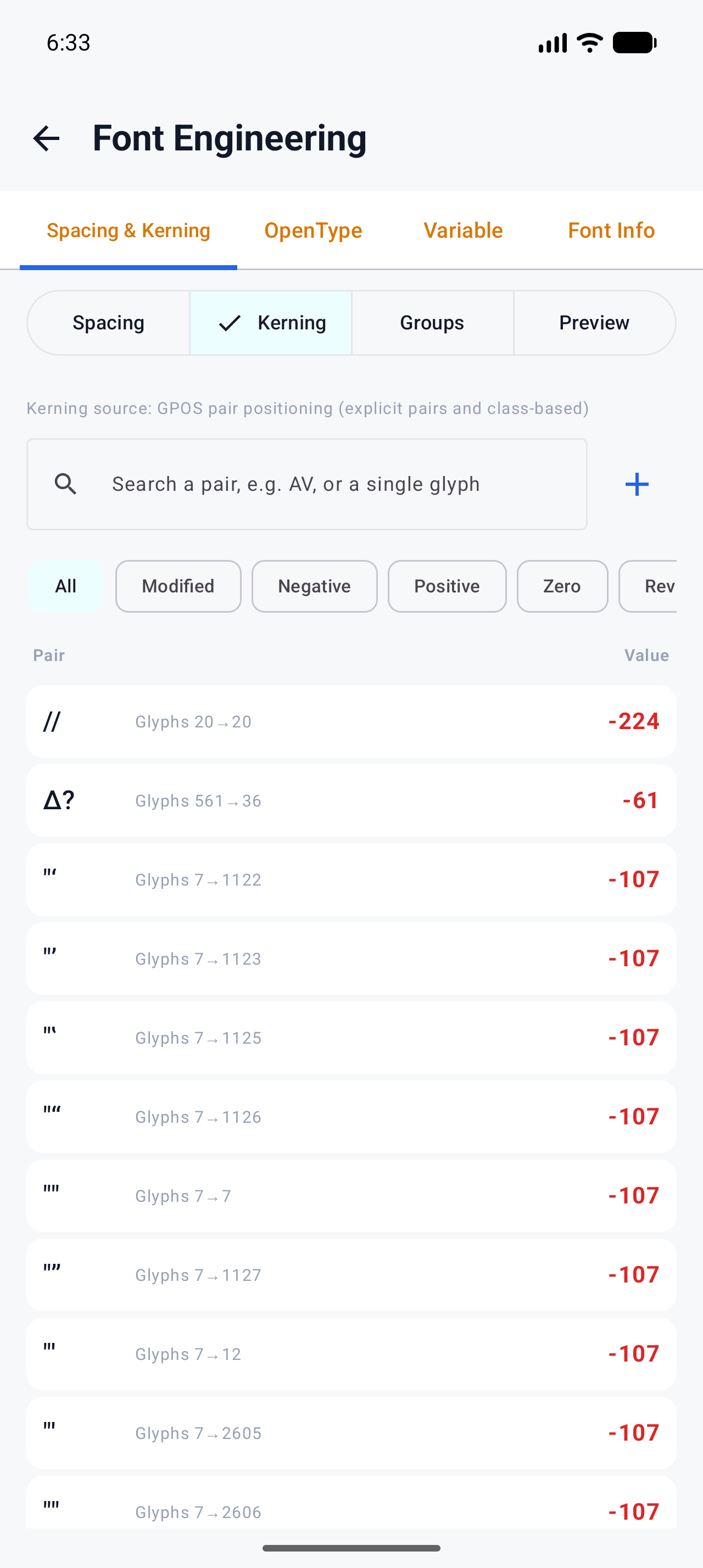
Editing kerning: what writes what
The Spacing & Kerning editor stages changes and writes them on Apply N Edit(s), as one undo step:
- Pair edits — including pairs that came from a legacy
kerntable — are written as a GPOS PairPos Format 1 override lookup. Existing GPOS structures are kept intact; the override sums with whatever was already there, exactly like shaper evaluation. - The moment GPOS kerning exists, the legacy
kerntable is removed — deliberately — so no renderer can apply both and double the kerning. - Class kerning (the Groups section) is written as one managed PairPos Format 2 class grid; explicit pairs keep working alongside it, because the shaper sums both.
- A live Before/After preview with per-script proof strings (Latin classic pairs, script-aware samples) shows the real effect through the platform shaper — the same engine that will render the font later.
One caveat to know about: subsetting tools historically dropped GPOS along
with everything else. Font Studio's subsetter rebuilds kerning into the subset
— GPOS pairs and single adjustments are carried over to the surviving glyph
set — so a subset keeps its kern (see How to reduce font file
size).
Warning If you need maximum compatibility with genuinely ancient software, the honest answer is: Font Studio writes kerning to GPOS only, so those renderers will ignore it. Everything shipped in the last fifteen years — every browser, every mobile OS — reads GPOS.
The spacing side of the house
Kerning is the last 10% of spacing; spacing and bearings are the first 90. The same editor handles advance widths, LSB and a computed RSB per glyph, with batch operations (adjust all advances, set side bearings, copy spacing from a reference glyph) — worth exhausting before touching a single pair. The kerning reference in the docs covers the value conventions (negative pulls pairs together, positive pushes apart, values are in font units).
What to try next
- Test before you ship: How to repair a corrupted font covers the validation pass every edited font should get.
- Format basics if any of the table names above were new: TTF vs OTF: the differences that actually matter