
How to reduce font file size
Shrink a font file by subsetting to the characters you actually use — routinely an 80–95% cut for Latin text — then validate and convert for the target platform.
You can shrink a font file dramatically — routinely an 80–95% cut for Latin-only text — by subsetting it to the characters your project actually uses, then converting for the target platform. The whole workflow runs in Font Studio on your device, and it's free.
Most fonts ship far more characters than any one project renders: multiple scripts, symbols, legacy layout tables. Text compression can't remove any of it — a gzipped font stays roughly the size it started. A subset removes the bytes outright.
What you'll need
- The font file: TTF or OTF
- The list of characters (or Unicode ranges) your project really renders
- A copy of the original — a subset is a one-way door
Step 1 — Collect the real character set
Gather the actual strings your app or site displays, then add what users might type: digits, punctuation, currency symbols (€, $, ©). A landing page set in a display font often needs roughly 70 glyphs — not the 2,000 the file carries.
Step 2 — Subset
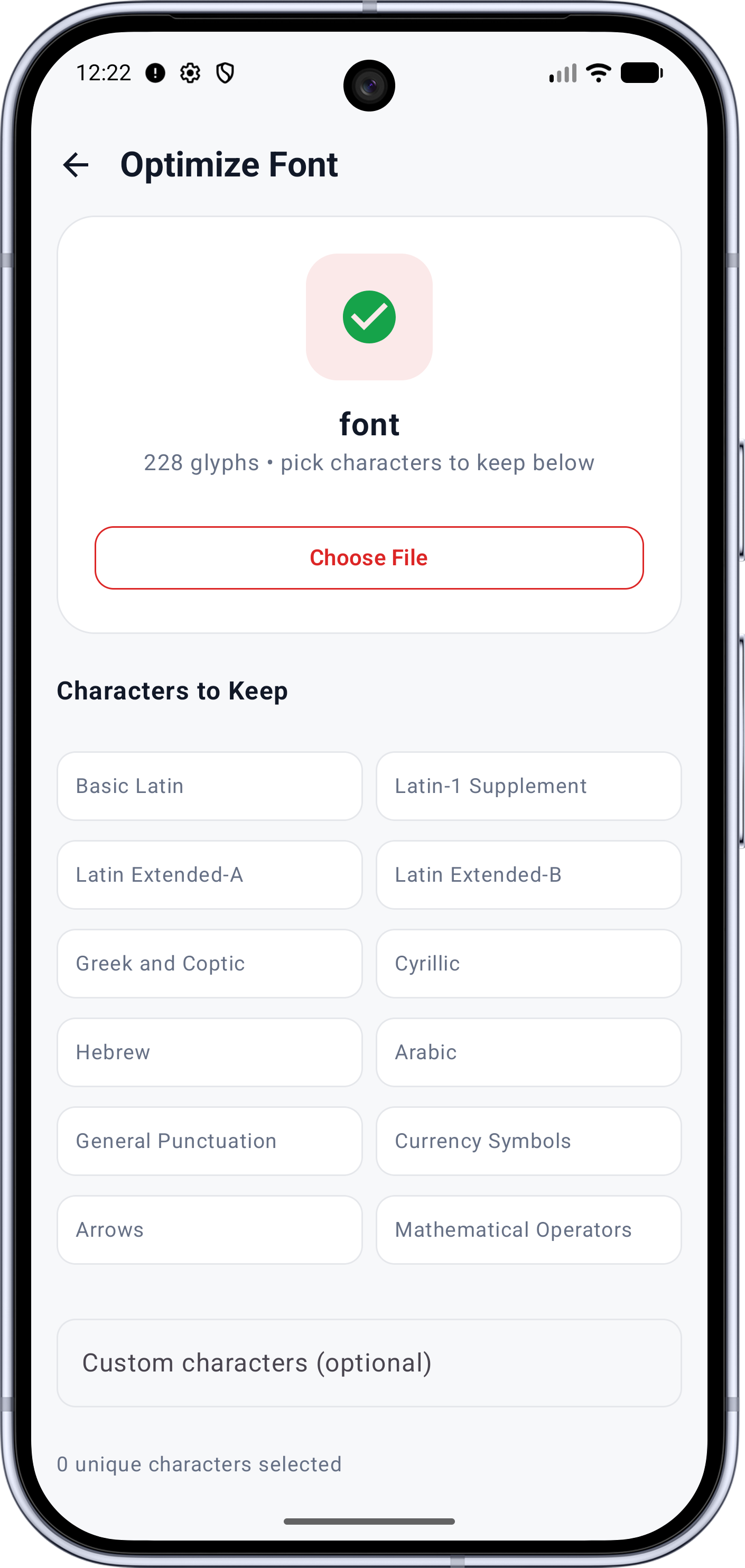
Open Subset Font, load your file, and define the scope:
- Range presets — tappable chips for twelve common ranges (Basic Latin, Latin-1 Supplement, Latin Extended, Greek, Cyrillic, Arabic, General Punctuation, Currency Symbols and more)
- Custom characters — a text field that keeps every character you type, even outside the presets
A live counter shows how many unique characters you've selected.
Run the subset. Under the hood the tool resolves your characters through the font's character map, expands composite-glyph references (an "é" keeps its base "e" and accent automatically), and rewrites the glyph data and metrics tables for the smaller set. The result screen reports:
- Glyphs kept — how many survived
- Characters matched — how many of your requested characters actually existed in the font
- File size — new size, old size, percentage saved
If any layout tables couldn't survive the rewrite, a warning lists them — for example kerning pairs that depended on dropped tables. The tool drops data it can't carry through correctly rather than writing a corrupt file; plain text rendering is unaffected.
Step 3 — Validate
Run Font Health on the subset — a quick structural check confirms the rewrite left a healthy file.
Step 4 — Convert for the target
- Web: convert to WOFF — or use the web package export (Pro), which
bundles the conversion with
@font-faceCSS and a preview page. See How to convert TTF to WOFF. - Apps: keep TTF — the format Android resources expect.
If it's still too big
- Audit the subset in the Unicode Explorer — leftover ranges are the usual culprit.
- Split by script — if several languages share the font, font splitting produces one file per range so each page loads only what it renders.
Note Keep the original file. It's your source of truth — and your license anchor. Redistributing a subset is redistributing a modified copy (licensing basics).
What to try next
- Know exactly which characters you don't need instead? How to remove unused glyphs from a font
- Shipping to a website? How to convert TTF to WOFF
Full documentation