
Why your font shows the wrong name (and how to rename it properly)
The name table holds several records — family, full name, PostScript — and every app reads a different one. Rename all of them as a consistent set, on your phone.
The font file opens fine, renders fine — and every app shows a different
name for it. The installer menu says one thing, macOS Font Book another,
your CSS font-family a third. Nothing is broken: the name table just holds
several independent records, and each app reads a different one. This guide
walks through those records with real font files, then renames a font
properly — family, full name and PostScript name together — on a phone in
Font Studio, verified by re-dumping the exported
file's name table.
The four records that matter
A font's name table is a list of strings keyed by name ID. Four IDs decide
practically everything:
| ID | Field | Example (Noto Naskh Arabic) | Read by |
|---|---|---|---|
| 1 | Family name | Noto Naskh Arabic | Font menus (legacy/RIBBI grouping) |
| 2 | Subfamily | Regular | The style slot next to the family |
| 4 | Full name | Noto Naskh Arabic | macOS Font Book title, document embedding |
| 6 | PostScript name | NotoNaskhArabic | Print pipelines, PDF internals, some SDKs |
Two records about ID 1 and 2 trip everyone up:
- The RIBBI rule. The legacy (Windows-era) family/subfamily pair only offers four style slots: Regular, Italic, Bold, Bold Italic. Anything else — Light, Black, Soft — gets stuffed into a new family with subfamily "Regular". That's why instancing "My Font Soft" produces family "My Font Soft", subfamily "Regular": it's not a naming bug, it's the RIBBI compromise every tool applies.
- IDs 16/17 (typographic family/subfamily) exist to preserve the true grouping alongside the RIBBI split — "My Font" + "Soft" — for apps modern enough to read them.
The PostScript name has its own rules: no spaces, a restricted character set (letters, digits, hyphen), historically capped near 29–63 characters depending on how old the consumer is. It identifies the font inside PDFs and PostScript output, which is why renaming a family without updating ID 6 leaves PDFs carrying the ghost of the old name.
Why apps disagree
They're reading different rows. Windows' font folder and most installers
show ID 1 + 2. macOS Font Book leads with ID 4. CSS matches
font-family against the family records (both 1 and 16 depending on
browser/platform). Design apps may show the full name. And a font whose
records disagree — family edited, full name left stale — shows the old
name in Font Book while everything else shows the new one. That exact
disagreement is the "wrong name" symptom, and the fix is writing the records
as a consistent set.
Inspect first
One fontTools pass prints the four rows for any font on a desktop:
from fontTools.ttLib import TTFont
f = TTFont("NotoNaskhArabic-Regular.ttf")
for r in f["name"].names:
    if r.nameID in (1, 2, 4, 6, 16, 17):
        print(r.nameID, r.toUnicode())
# 1 Noto Naskh Arabic / 2 Regular / 4 Noto Naskh Arabic / 6 NotoNaskhArabic
On the phone, Font Studio's Font Info tab (Pro) shows the same records
as editable fields: family, subfamily, full name, PostScript name, version,
copyright, plus the machine-readable bits (fsType embedding permissions,
fsSelection).
Renaming, the whole set at once
The rename for this walkthrough: turn "Noto Naskh Arabic" into "Naskh Studio Demo".
- Open the font → Font Command Center → Font Engineering → Font Info.
- Edit Family Name →
Naskh Studio Demo. - Edit Full Name →
Naskh Studio Demo Regular. - Edit PostScript Name →
NaskhStudioDemo-Regular(the convention: family + style, no spaces). - Apply 1 Edit(s) — the bar stages naming changes like every other Font Engineering edit, as one undo step.
- Export.
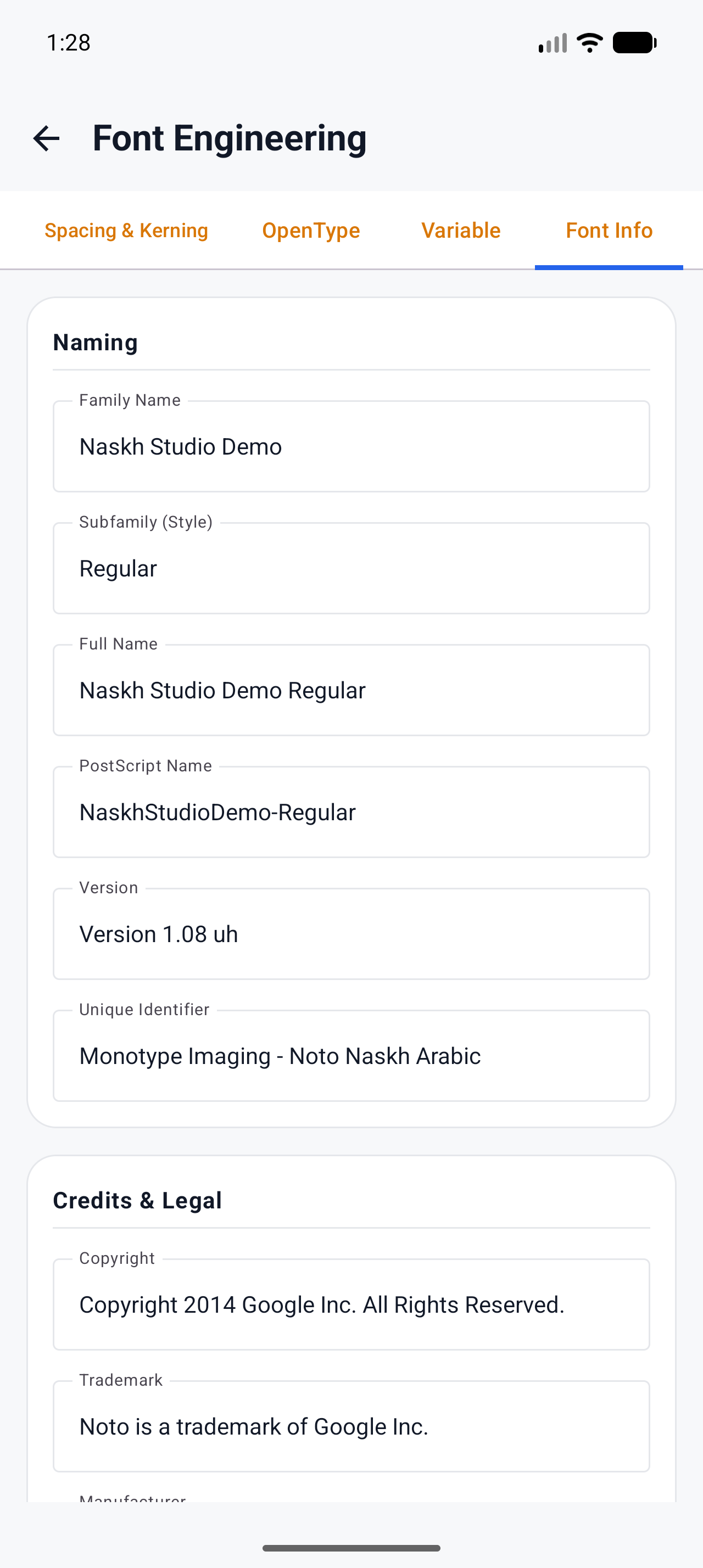
The exported font re-dumped through fontTools shows the consistent set —
ID 1 Naskh Studio Demo, ID 2 Regular, ID 4 Naskh Studio Demo Regular,
ID 6 NaskhStudioDemo-Regular — with all 1,533 glyphs and every other table
untouched. The Command Center header reads the family from the name table,
so it picked up "Naskh Studio Demo" immediately after the Apply.
Warning The name editor writes what you edit — it does not silently sync the other IDs for you. Change only the family and your full name (ID 4) keeps saying the old thing, which resurrects the macOS-shows-the-old-name bug you were fixing. Touch 1, 2, 4 and 6 together; that's the whole lesson.
One distinction that saves confusion: renaming the project (in the Projects list) renames your working file inside the app. Renaming the font means editing the name table — the project rename changes nothing inside the exported TTF.
What breaks when it's done wrong
- Family edited, ID 4 stale: Font Book and some document workflows show the old name (the disagreement above).
- PS name left stale: PDFs and print spoolers internally reference the old PostScript name; font-diff tools and some licensing checkers match on it too.
- Spaces or bad characters in the PS name: some consumers truncate or reject it — the character restriction is why ID 6 exists as its own field in the first place.
- Style crammed into the family ("My Font Soft Regular" as a family with bold synthesized): renders faux-bold instead of the real cut. The RIBBI split exists precisely so this doesn't happen; if you're building a family, see the docs on naming tables & metadata for the ID 16/17 pairing.
What to try next
- Where styles and family grouping meet instancing: From variable to static: instancing a variable font
- The canonical field-by-field reference: Naming tables & metadata
- The editing loop this rename fits into: How to edit a TTF font