
Converting TTF to WOFF2: what Brotli actually buys you
WOFF2 transforms your font's internals before Brotli ever runs — measured 54–57% of the original TTF on real fonts. What changes, what doesn't, and how to convert on device.
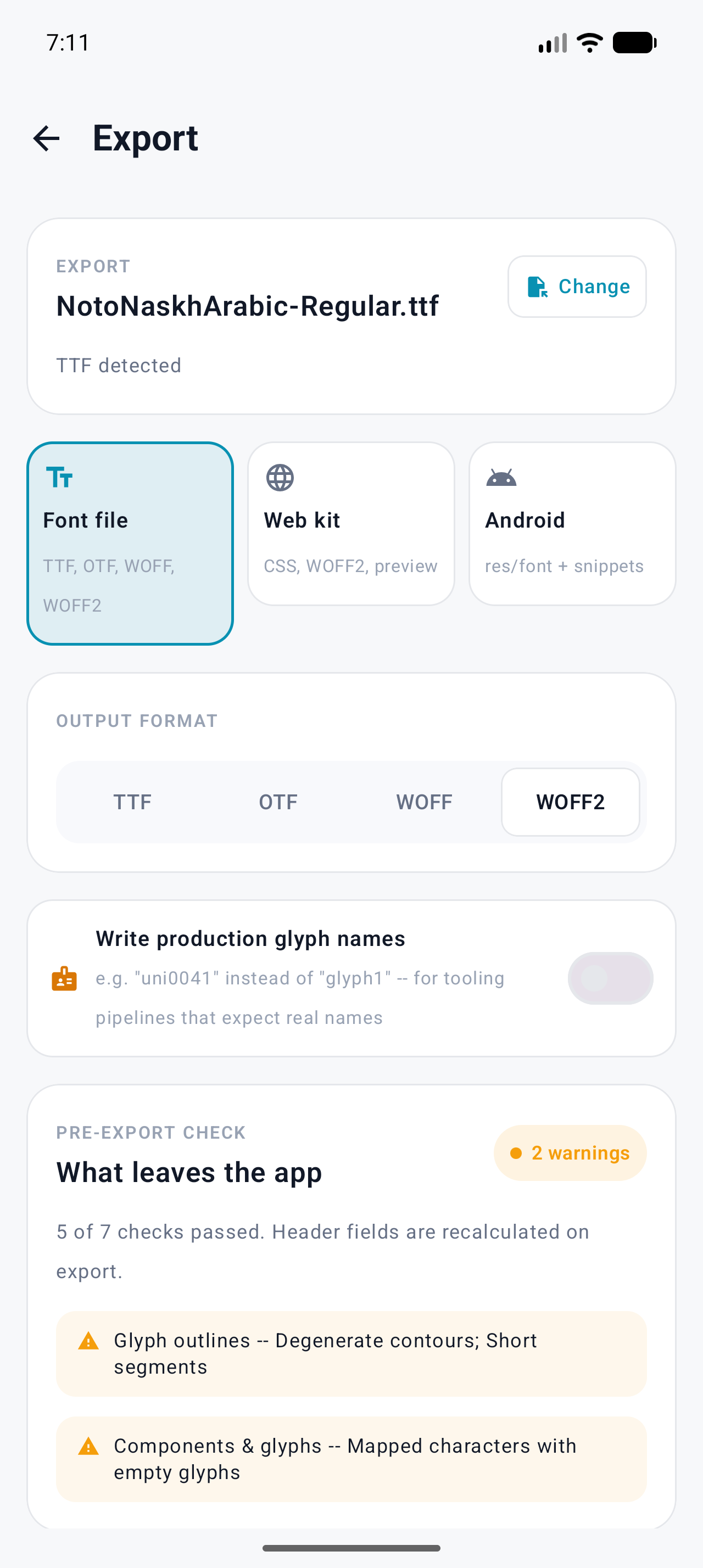
WOFF2 is not a compression setting — it's a different file format that rebuilds your font's internals before compressing, and that's where the extra savings come from. Converting is one tap in Font Studio's Export screen (free): pick WOFF2 in the Font file card, pass the pre-export check, save. On the two fonts measured for this article it cut the download to 54–57% of the original TTF.
What WOFF2 actually changes
A TTF stores glyph outlines in the glyf table, each glyph as a stream of
quadratic curves compressed per-glyph with redundant data left in place for
fast random access. WOFF2 (the 2012 W3C spec, built around Google's Brotli
codec) does three things before Brotli ever runs:
- Transforms
glyf— splits each glyph into its bare outline data and side tables (locabecomes optional), so similar data sits together and compresses as a block instead of being interleaved. - Transforms hinting tables the same way (
cvt,fpgm,prep). - Declares known table tags with 1-byte flags instead of 4-byte tags, and encodes table lengths relative to a predicted order.
Only then does Brotli — a context-mixing compressor notably better than zlib on this kind of data — compress the whole package. The result is still a font: every browser since roughly 2016 (Chrome 36+, Firefox 39+, Safari 10+, Edge 14+) decodes it back to the identical outlines at load time.
What WOFF2 does not do: remove glyphs, change hinting, touch the name table, or alter rendering. It's lossless by spec, and the decompressed tables hash back to the same values.
What it buys you, measured
Both conversions below were made on-device in Font Studio, then checked with fontTools:
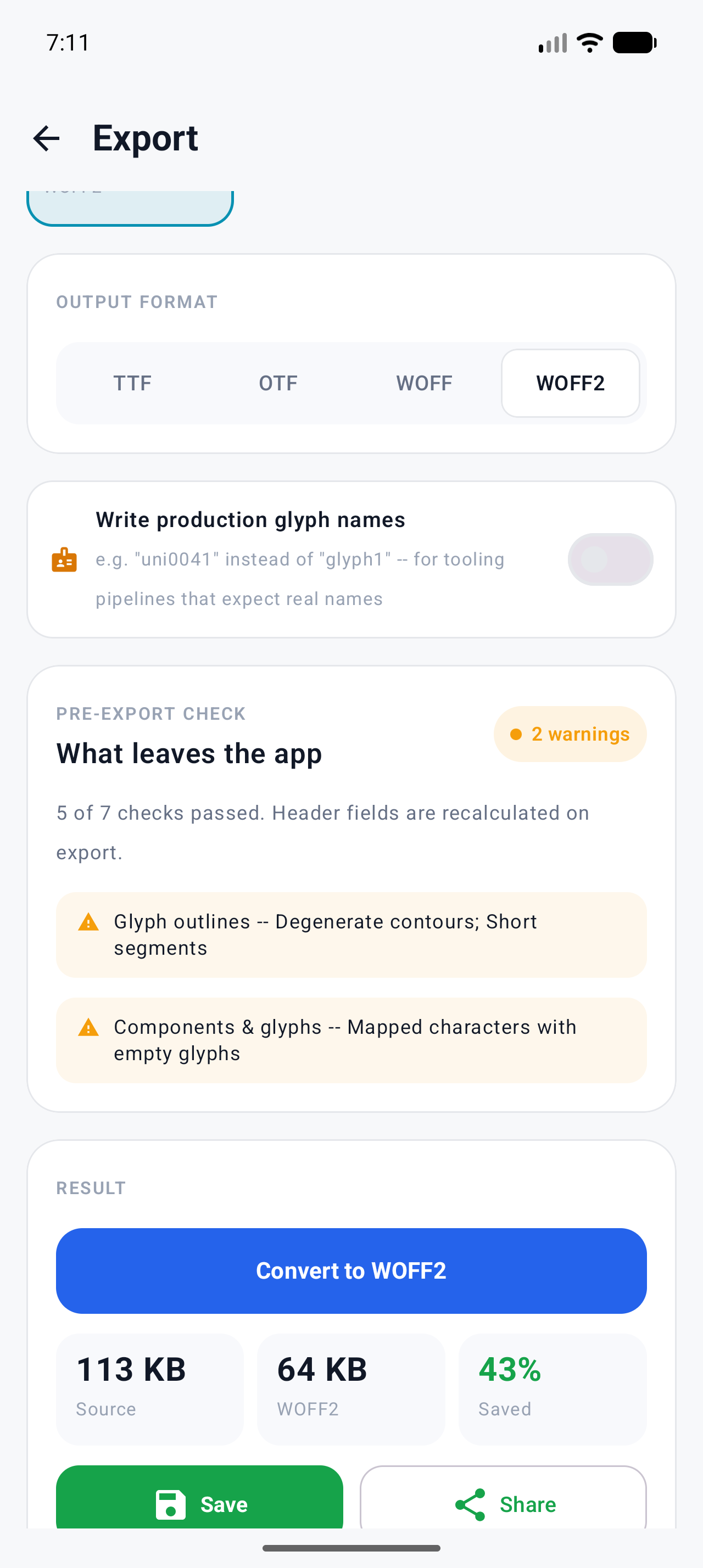
| Font | TTF | WOFF2 (in-app) | Ratio | |---|---|---|---| | Noto Naskh Arabic Regular (1,533 glyphs) | 116,716 B | 66,513 B | 57% | | Roboto Regular (3,366 glyphs) | 2,336,500 B | 1,254,436 B | 54% |
Both land inside the 40–55%-of-original band the app documents for WOFF2 exports. Your numbers will move with the font: big CJK or emoji fonts with bitmap tables compress differently, hinted desktop fonts lose a bit more (hinting compresses well once transformed), and already-subsetted fonts have less redundancy to squeeze. For reference, fontTools' Brotli encoder packed the same Naskh file to 52,416 B — different encoders land in the same neighborhood, not on the same byte.
Converting in Font Studio
- Open the TTF, then Export (top-bar icon or ⋮ Command Center → Export).
- Pick the Font file card — free, no account tricks — and choose WOFF2.
- Read the Pre-export check. It runs before every export: findings list, errors block the build button with a "Fix in Font Health" link, warnings don't block.
- Convert to WOFF2. The Result screen shows sizes before → after.
- Save or Share — the original TTF is never modified.
Verifying the output
On a desktop, fontTools reads WOFF2 back directly:
from fontTools.ttLib import TTFont
f = TTFont("NotoNaskhArabic-Regular.woff2")  # flavor reports "woff2"
print(f["maxp"].numGlyphs)                   # 1533 — same glyph set
f.flavor = None
f.save("decompressed.ttf")                   # round-trips to a valid TTF
The app's WOFF2 exports pass this check: flavor woff2, same glyph count,
outlines identical after decompression. In the browser, DevTools' Network
tab showing content-encoding plus a rendered font is the everyday
equivalent.
WOFF, WOFF2, or just serve the TTF?
- WOFF2 everywhere. Every browser you care about supports it; it's the
smallest lossless option, and
@font-facedoesn't care which wrapper you hand it. - WOFF only as a legacy fallback for tools a decade old — How to convert TTF to WOFF covers that path.
- Raw TTF works in
@font-facetoo, but you're shipping 40–50% more bytes for zero benefit.
The CSS side doesn't change: one @font-face with src: url(...woff2) format("woff2"), your regular font-family stack after it for fallback.
The smaller-payload lever: subset first
WOFF2 compresses; it doesn't decide what to ship. A full Roboto wrapped in
WOFF2 is still 3,366 glyphs when your site renders 200. Subsetting first —
routinely an 80–95% cut for Latin text — then converting is the real
one-two punch; see
How to reduce font file size.
For the whole pipeline in one step, Font Studio's Web kit export (Pro)
builds a kit with @font-face CSS, web subsetting presets, and a preview
page — with two disclosed limits: variable fonts ship whole (never subset in
the kit), and CFF/OTF-flavored fonts can't be subset at all.
Note WOFF2 is a write-only detour in Font Studio: the app exports it but won't open WOFF/WOFF2 files as documents. Keep the TTF — it stays your source of truth.
What to try next
- The WOFF1 sibling, and when zlib-wrapper is enough: How to convert TTF to WOFF
- Format picking in general: TTF vs OTF: the differences that actually matter
- The full reference on targets and what carries over: WOFF2 reference
Full documentation