
Fixing Arabic joining: building Lam-Alef ligatures that actually shape
Why an Arabic font with every letter still renders disconnected: joining types, init/medi/fina substitutions, the rlig ligature family — and how to build fonts that join.
An Arabic font can contain every letter of the alphabet — all 28 base letters, the harakat, even the Persian additions — and still render as disconnected gibberish. The codepoints are there; the joining is not. Arabic letters change shape depending on position (initial, medial, final, isolated), and that selection happens at shaping time through GSUB substitutions the font must provide. No GSUB, no joining — no matter how complete the character set is.
This guide explains the machinery — joining types, the init/medi/fina
substitutions, the rlig feature, and the Lam-Alef family — and how to build
fonts that actually join in Font Studio, where the New Font
Wizard wires all of it automatically.
Joining types: which letters connect to what
Unicode assigns every Arabic letter a joining type. Two matter here:
- Dual-joining (22 of the standard letters): connects on both sides. Beh, Teh, Jeem, Seen, Lam, Noon, Heh, Yeh and so on need three extra shapes each — initial, medial and final — beyond the isolated form the cmap maps.
- Right-joining only (the rest): never connects to a following letter, so they only ever appear isolated or final. Alef, Dal, Thal, Reh, Zain, Waw, plus the three Alef variants (madda, hamza above, hamza below — the diacritic rides on the same base shape and doesn't change the joining behaviour).
The shaper (HarfBuzz on Android and Linux, CoreText on Apple) looks at each letter's joining type and its neighbours in the string, decides which positional form each letter needs, then asks the font's GSUB for it:
| Letter needs | GSUB feature | Example (Beh) |
|---|---|---|
| Start of a word, joins forward | init | بـ |
| Middle of a word | medi | ـبـ |
| End of a word | fina | ـب |
| Alone | (base glyph, no substitution) | ب |
These are Single Substitutions: base glyph → positional glyph, one rule
per form per letter. No contextual logic lives in the font — the shaper
provides the context. That's why a font with isolated forms only can never
join: the shaper asks for medi, the font has no medi, and the isolated
form is used.
You can inspect exactly this in any real Arabic font. In Noto Naskh Arabic
(1,533 glyphs), the arab script section of GSUB carries 5 lookups each for
init, medi and fina, alongside 10 rlig and 30 ccmp lookups.
Lam-Alef: the ligature Arabic can't live without
Lam (ل) is dual-joining and Alef is right-joining-only. Typed in sequence —
ل + ا — simple positional logic would produce Lam's final form followed by a
disconnected Alef. Real Arabic never writes that: the pair collapses into the
single ligature لا. This substitution is not optional decoration; it's the
rlig (Required Ligatures) feature, which shapers apply always, in every
app, with no setting to turn it off.
The family has five members, and a complete Arabic font needs all five:
| Sequence | Codepoints | Presentation forms | |---|---|---| | Lam + Alef | ل + ا | U+FEFB / U+FEFC | | Lam + Alef with hamza above | ل + أ | U+FEF7 / U+FEF8 | | Lam + Alef with hamza below | ل + إ | U+FEF9 / U+FEFA | | Lam + Alef with madda | ل + آ | U+FEF5 / U+FEF6 | | Lam + Lam + Heh (Lillah) | ل + ل + ه | — |
The last one — لله, the tail of the word "Allah" — is the traditional composition, and it's a three-glyph ligature. Unicode even reserves presentation-form codepoints for the four two-glyph members (the U+FEF5–U+FEFC block), which mature fonts like Noto Naskh map directly.
One ordering detail that breaks naive implementations: rlig must run
after the positional substitutions. By the time the ligature lookup fires,
Lam has already been substituted to its initial/medial form — so the rule's
input is post-positional glyphs, not the isolated ones the cmap maps. A
shaper runs init/medi/fina first, then rlig; a font authoring tool
that wires rlig from isolated forms produces a font that never ligates.
Seeing it: positional forms in the Glyph Board
Open any Arabic font in Font Studio's workspace, tap a letter in the Glyphs tab, and use Open in Glyph Board. For joining scripts the board shows every positional form the font actually has, with the real glyph names — and, below, the letter inside real words, one per position it can occupy:
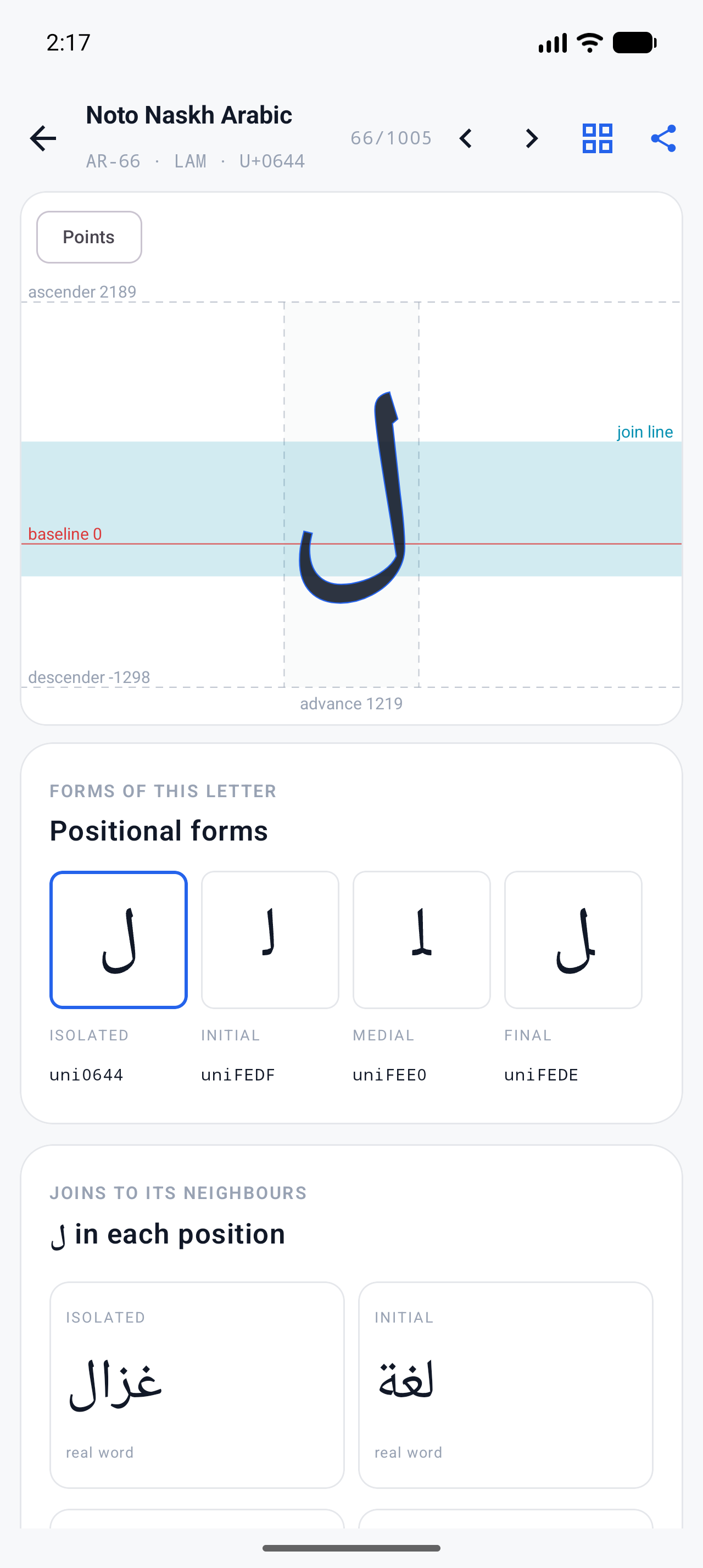
This is the fastest diagnostic for "my Arabic font won't join": if a letter shows only its isolated form, the GSUB positional substitutions are missing, and no amount of re-encoding the cmap will fix it.
Building a joining font in Font Studio
The New Font Wizard (Home → "+" → Start New Font) does the wiring for you. Pick the Arabic segments — Letters, Harakat, Numbers, Punctuation, plus the Lam-Alef family and the extended Persian/Urdu/Kurdish letters — and the wizard queues one card per glyph: the 22 dual-joining letters get initial/medial/final cards alongside their isolated form, right-joining letters get only the forms they can take, and the five ligatures get their own cards.
Draw (or import) each card, and at the finish the wizard assembles:
- positional-form glyphs and their
init/medi/finasingle substitutions, wired for every form you actually designed; - the Lam-Alef
rligfamily, sequenced after the positional substitutions exactly as the shaper expects — the three-glyph Lillah included, matched longest-first; - harakat as zero-advance-width marks, so they stack on their base letters instead of consuming horizontal space;
- joining behaviour for the 19 extended letters (Peh, Tcheh, Jeh, Gaf, Keheh, Farsi Yeh, Yeh Barree and friends) taken from Unicode's own joining properties — not guessed from what the letters look like. Noon Ghunna, for instance, looks like a dotless Noon but is still dual-joining; Yeh Barree looks related but is right-joining only.
The wizard's per-glyph design step is free; the paid tier removes the sequential, ad-supported flow.
Fixing a font that doesn't join
A font imported from elsewhere that renders disconnected needs the GSUB built.
In Font Studio that's Font Command Center → Font Engineering → OpenType
(Pro): create the single substitutions (sub <isolated> by <positional>;) and
the rlig ligature rules, or import a
feature file
with the rules written out. The test that matters is shaper output, not the
glyph grid — use the workspace Preview with Arabic sample text, or the
feature's Test in Preview button, and check that بـ + ـبـ actually appear.
What to try next
- The character-set side of the story: How to remove unused glyphs from a font
- How coverage is inspected at all: Unicode basics in the docs.
Full documentation